Key Authentication (Key Auth)
概要
Key Authentication (key-auth) ポリシーは、API 消費者がリクエストヘッダーに有効な API Key を含めることを要求することで、API セキュリティを強化します。このメカニズムにより、認可されたユーザーまたはアプリケーションのみが API にアクセスできるようになります。
キー認証の仕組み
- API 消費者は、リクエストヘッダーに valid API Key を提供する必要があります。
- API ゲートウェイは、リクエストを処理する前に API キーを検証します。
- API キーが missing または invalid の場合、リクエストは認証エラーで拒否されます。
キー認証を使用するタイミング
- API アクセスを authorized clients に制限するため。
- API consumer identification メカニズムが必要な場合。
- combining multiple authentication methods (例: key-auth + JWT) の場合。
Note: key-auth と JWT authentication の両方が有効になっている場合、both 認証メソッドを渡す必要があります。
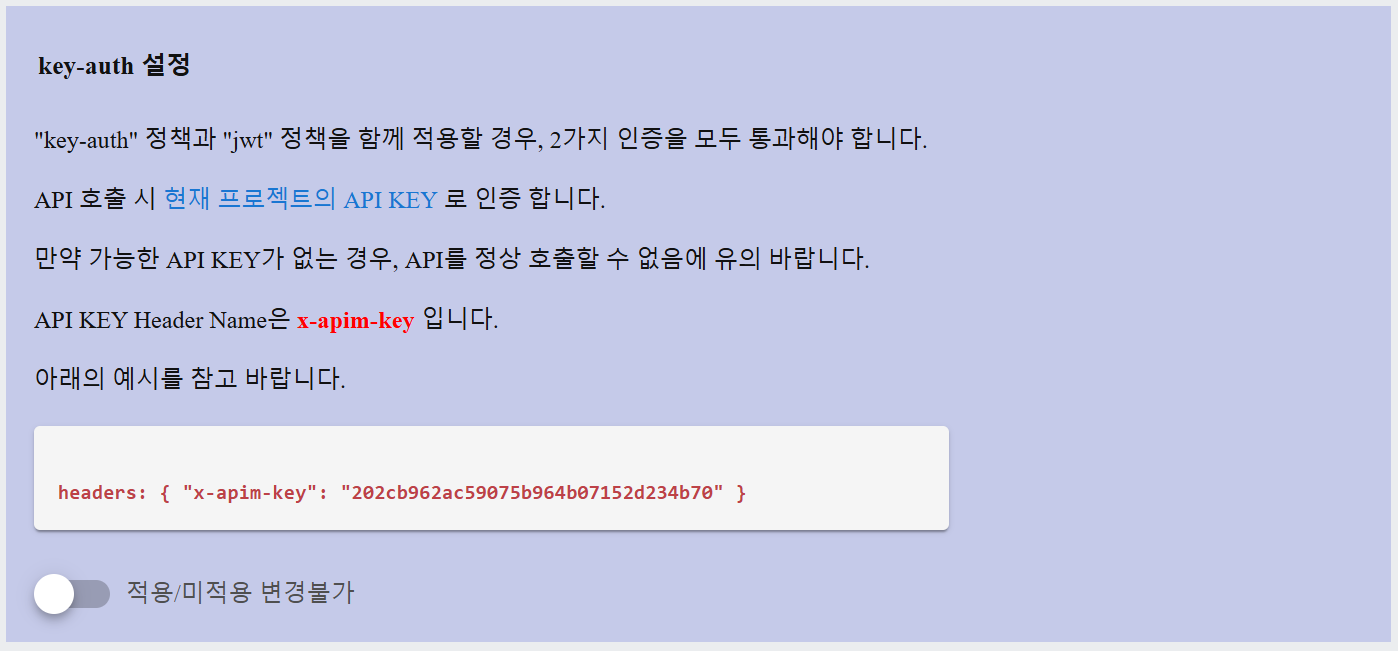
一般的な原因:
- ヘッダー名が間違っている
- API キーにタイプミスや末尾のスペースがある
- API キーが正しいプロジェクトに属していない
- API キーが削除または再生成された
- JWT ポリシーも有効であり、提供されていない
設定の詳細
API キーの作成
Key Authentication ポリシーを適用する前に、API キーを生成する必要があります。次の手順に従ってください:
Step 1: Open the API Key Management Page- APIM コンソールの APIM Management メニューに移動します
- API キーを作成したいプロジェクトを選択します。
- Create API Key ボタンをクリックします。
- APIキーのためにdescriptionを入力してください(例:"モバイルアプリアクセス用のキー")。
- システムはautomatically generate a unique API Keyを行います。
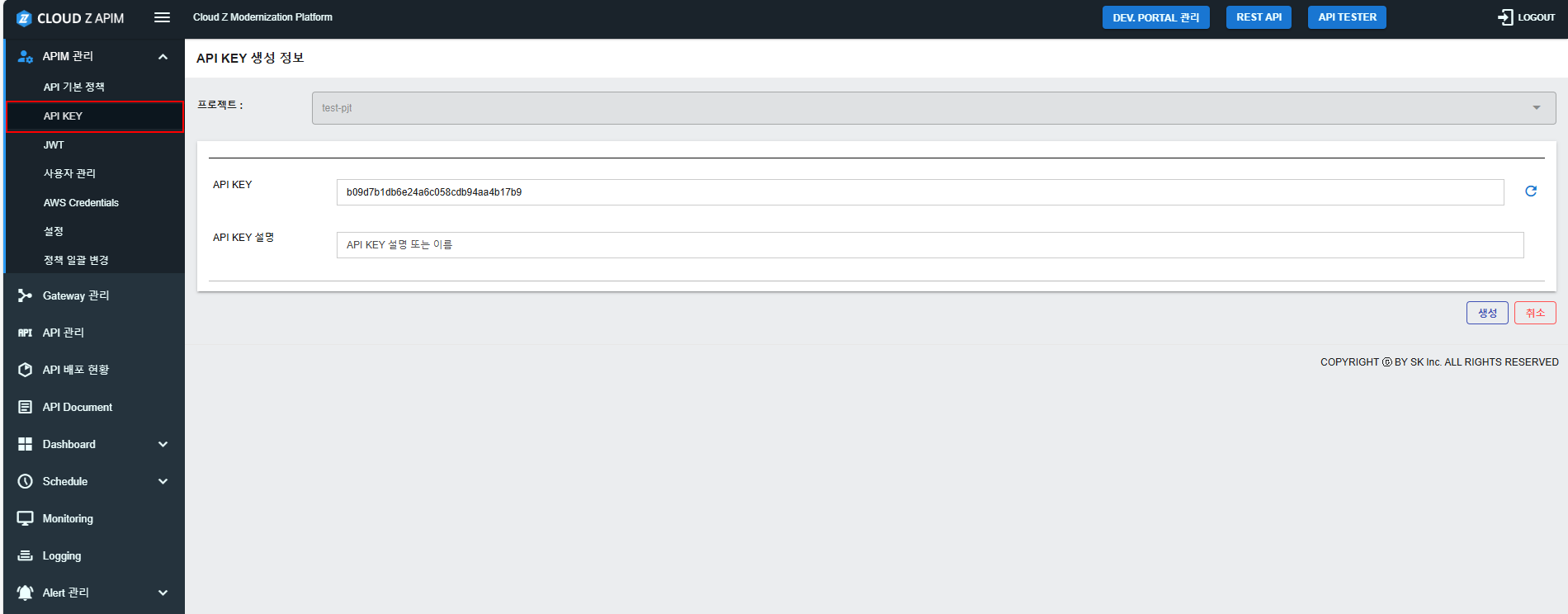
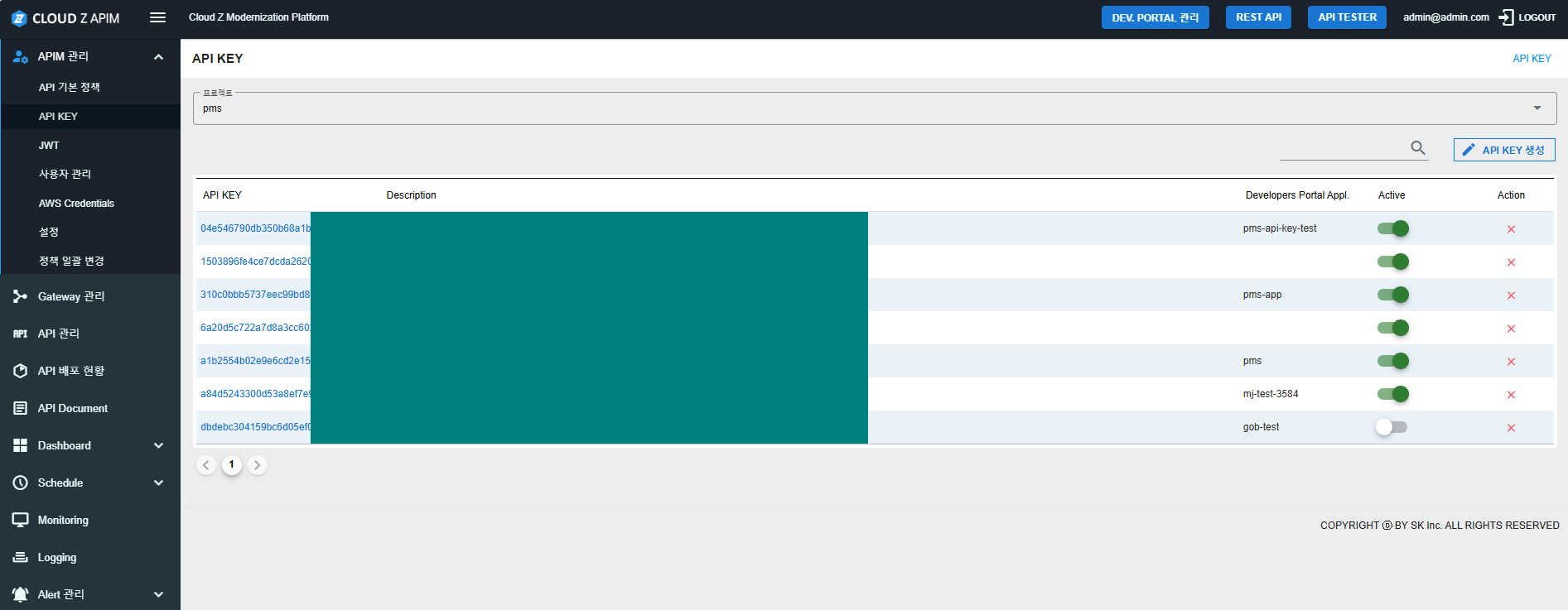
- 作成されると、APIキーはAPIキー管理画面に表示されます。
- ユーザーはAPIキーを探して再度コピーすることができます。
設定フィールド
Key Authenticationポリシーには、以下の設定が含まれています:
| Field Name | Description | Data Input |
|---|---|---|
| ヘッダー名 | APIキーがリクエストに含まれるべきHTTP header。デフォルトのヘッダー名はx-apim-keyです。Kubernetesデプロイメント「apim-dff」では、環境変数を介してヘッダー名を変更できます。これらの変数を変更すると、APIMコンソールが再起動され、短時間のサービス中断が発生する可能性があります。 | 環境変数を介して設定可能(K8sのみ)。 |
| APIキー検証 | システムは、提供されたAPIキーが登録されていて有効であるかを確認し、APIアクセスを許可します。 注:APIキーは通常、32文字の英数字の文字列です。 | 自動検証 |
| エラーハンドリング | 有効なAPIキーが提供されない場合、リクエストはHTTP 401 Unauthorizedレスポンスで拒否されます。 | 自動レスポンス |
キー認証を使用したAPI呼び出しの例
認証されたAPIリクエストを行うには、リクエストヘッダーにAPI Keyを含めてください:
GET /api/resource HTTP/1.1
Host: api.example.com
headers: { "x-apim-key": "202cb962ac59075b964b07152d234b70" }
APIキーが有効な場合、リクエストは正常に処理されます。そうでない場合、レスポンスは次のようになります:
{
    "message": "無効な認証情報",
    "status": 401
}
- Examples of complete front matter preservation: Input: "--- id: 3-building-a-demo-application title: '3. Building a Demo Application' sidebar_position: 3 ---" Output: "--- id: 3-building-a-demo-application title: '3. Building a Demo Application' sidebar_position: 3 ---"
-
Header Translation Rules:
-
You MUST translate ALL headers (lines starting with #)
-
For headers with section IDs:
- Translate the text part BEFORE the section ID
- Keep the section ID (part with
{#...}) in English - Keep the exact number of # characters
-
Examples: Input: "## Creating Build Pipelines
{#creating-build-pipelines}" Output: "## ビルドパイプラインの作成{#creating-build-pipelines}"Input: "### Demo Application
{#demo-application}" Output: "### デモアプリケーション{#demo-application}"Input: "## Running Each Pipeline
{#running-each-pipeline}" Output: "## 各パイプラインの実行{#running-each-pipeline}" -
For headers without section IDs:
- Translate the entire header text
- Keep the exact number of # characters
-
Examples: Input: "## Overview" Output: "## 概要"
-
-
Paragraph Translation Rules:
-
Translate ALL paragraphs and text content
-
Translate ALL bullet points and list items
-
Translate ALL blockquotes (lines starting with >)
-
Translate ALL inline text between HTML tags
-
Translate ALL text in tables except for technical terms
-
Translate ALL text in code block comments
-
NEVER leave any English text untranslated unless it's explicitly listed in "Keep in English"
-
Examples: Input: "This is a paragraph about Cloud Z CP features." Output: "これはCloud Z CPの機能についての段落です。"
Input: "- First bullet point about API usage" Output: "- API使用に関する最初の箇条書き"
Input: "> Important note about SDK implementation" Output: "> SDK実装に関する重要な注意"
Input: "Warning: Check your configuration" Output: "警告: 設定を確認してください"
-
-
Table Rules:
- Keep table structure and alignment exactly as is
- Keep table header row formatting (| --- |)
- Keep
<b>tags in table cells exactly as is - Translate cell content but preserve:
- Technical terms (e.g., Administrator, Developer, Pipeline)
- Yes/No values
- O/X values
- Technical status values (e.g., Connected, Pending)
- Examples: Input: "| Feature | Description | Status |" Output: "| 機能 | 説明 | ステータス |"
-
Keep in English:
- ALL front matter content (title, id, etc. must stay in original English)
- All section IDs (text after
{#}) - All technical product names (e.g., Cloud Z CP, AWS EKS)
- All technical component names (e.g., API, SDK)
- All code snippets and commands
- All file paths and URLs
- All placeholders (e.g., HTML_123)
- All environment variables (e.g., $HOME, $PATH)
- All command-line arguments (e.g., --help, -v)
- All configuration keys and values
- All error codes and status codes
-
HTML/Markdown Preservation:
- Keep all HTML tags exactly as is (
<b>,</b>, etc.) - Keep all markdown syntax (*, -, >, etc.)
- Keep all code block markers (```) and language identifiers
- Keep all image paths exactly as is
- Keep all link references and URLs
- Keep all formatting characters
- Keep all HTML tags exactly as is (
Original text: