Create Gateway
The Create Gateway screen allows users to configure and create a new Gateway.
Access Create Gateway Screen
From the Gateway List page, click Create Gateway button at the top-right corner of the screen.

Step 1: Fill in the Create Gateway form
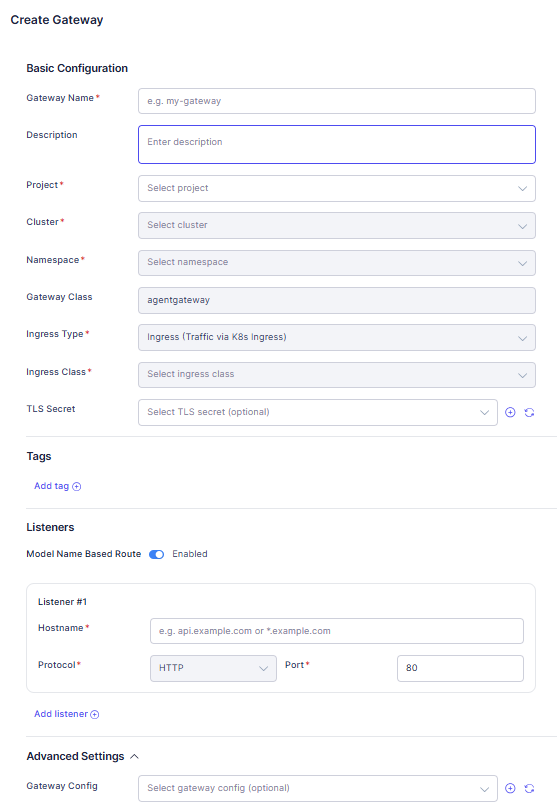
Basic Configuration:
- Gateway Name (Required): Gateway identifier (e.g., my-gateway). Must follow Kubernetes naming rules:
- Lowercase letters/ numbers/ hyphen
- 1–63 characters.
- Project (Required): Select a project (depend on workspace context).
- Cluster (Required): Select a cluster under the chosen Project.
- Namespace (Required): Select a namespace under the chosen Cluster.
- Gateway Class: Displays default value (Default value: agentgateway).
- Ingress Type (Required): Select traffic entry type (e.g., Ingress (Traffic via K8s Ingress)).
- Ingress Class (Required): Select an ingressClass depending on the chosen Ingress Type.
- TLS Secret (Optional): Select a TLS Secret.
- Click ➕ to create a new TLS Secret immediately and then select it.
- Click 🔄 to refresh the TLS Secret list.
Tags:
User can add multiple tags for filtering on the Gateway list.
-
Click Add tag and enter Key and Value:

-
Multiple tags are supported.
Listeners:
- Model Name Based Route toggle:
- Enabled: Shows routing options based on Model Name in Listener.
- Disabled: Use standard routing.
- By default, Listener #1 card is provided, and user can also add or remove other listeners.
Advanced Settings:
- Gateway Config: Select a gateway config from the list (optional).
- Click ➕ to create a new gateway config and then select it.
- Click 🔄 to reload the available gateway config list.
Step 2: Save or Cancel
- After completing the form, click Save to create Gateway.
- In case you want to discard the changes, click Cancel and navigates back to the Gateway List page.