Monitoring
Overview
- Clicking the Monitoring menu will redirect you to the Grafana Dashboard screen.
- The Grafana Dashboard has a dedicated dashboard where you can monitor Kong resources. (Dashboards → General → Kong)
- If you are logged into the APIM Console but the login screen appears again on the Grafana Dashboard, you can log in by clicking the [Sign in with OAuth] button.
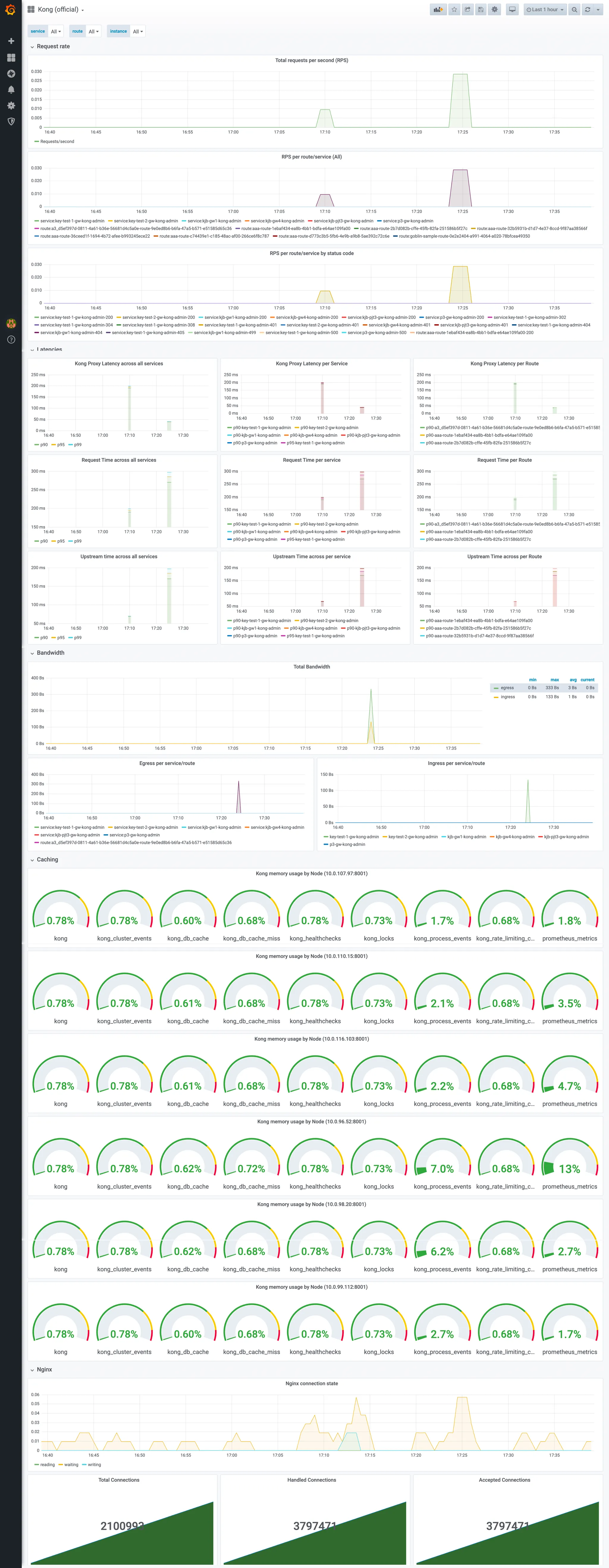
Explaination
- service: The backend service inside the Kong Gateway.
- route: The API endpoint called by the frontend service inside the Kong Gateway.
- instance: A Kong Gateway instance.
- Total requests per second (RPS): The total number of requests per second.
- RPS per route/service (All): The number of requests per second for each API (route+service).
- RPS for route/service by status code: The number of requests per second for each API (route+service), categorized by status code.
- Kong Proxy Latency: The latency of the Kong Gateway Proxy.
- Upstream Time: The latency of the backend service.
- Request Time: Kong Proxy Latency + Upstream Time.
- Egress: The amount of outbound traffic.
- Ingress: The amount of inbound traffic.
- Total Bandwidth: Ingress + Egress.
- Caching: The usage rate of each detailed cache memory compared to the total memory of the Kong Gateway.
- Nginx
- reading: The current number of connections where Nginx is reading the request header.
- writing: The current number of connections where Nginx is writing the response back to the client.
- waiting: The current number of idle client connections waiting for a request.
- Total Connections: The total number of client requests since the Nginx master process started.
- Handled Connections: Connections that Nginx has finished writing data to the client, successfully completing and closing the request.
- Accepted Connections: A connection moves to the Accepted state after the TCP handshake and then takes one of three sub-states (waiting/reading/writing).