Version History
The Agent Profile’s Version History feature enables you to view, manage, and restore previous versions of your agent profile. This helps ensure traceability, accountability, and recovery in case of mistakes or unexpected changes.
View the Version History List
To access the version history of a agent profile:
-
Select the Agent Profile you wish to share from your dashboard.
-
Click the ‘Edit’ button (pencil icon) to open the profile editor.
-
In the top action bar, click the ‘History’ icon to open the Version History dialog.

The Version History dialog will appear, listing all available versions of the agent profile:
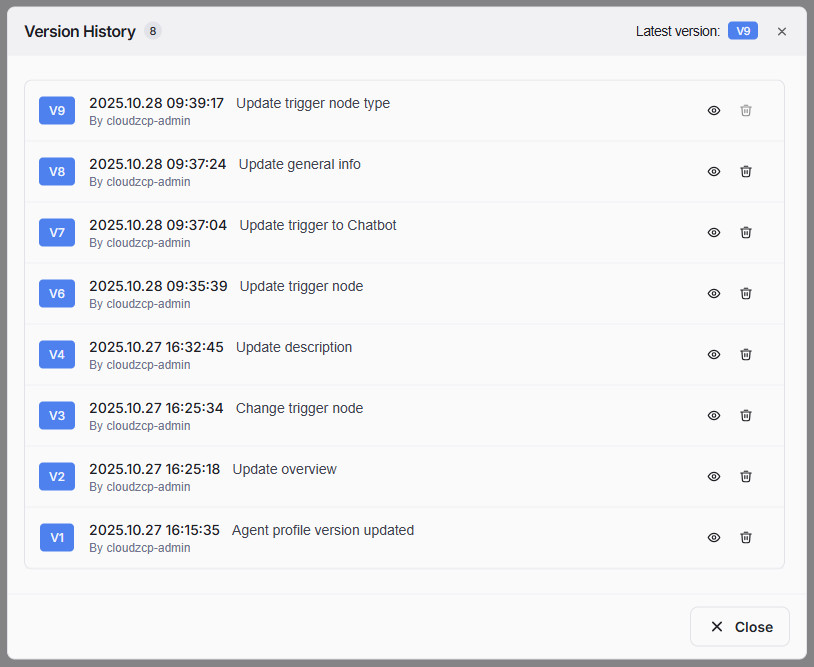
Each version entry displays:
- The version number (e.g., V9, V8)
- Timestamp of creation
- Author who made the change
- A brief summary of what was updated
- The total number of versions is indicated beside the Version History title.
- The most recent version is indicated at the top right as Latest version: [Version Number].
Delete a Version
To delete an older version:
- In the Version History dialog, locate the version you want to delete.
- Click the trash icon next to that version.
- Deleted versions cannot be recovered.
- You cannot delete the latest version to ensure you always have a fallback.
- If the current version is still in draft, you cannot delete previous version.
-
When you click the trash icon, a confirmation dialog will appear:
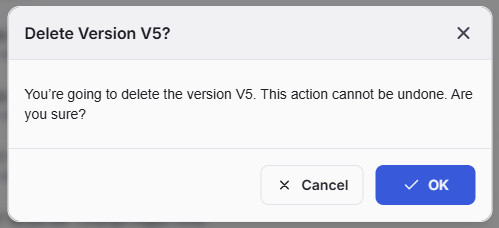
- Click OK to confirm the deletion.
- Click Cancel if you do not wish to proceed.
View a Specific Version
To view a previous version in agent profile editor workspace:
-
In the Version History dialog, click the eye icon next to the desired version.
-
The editor will switch to display the selected version. At the top of the editor bar, the current version number (e.g., V6) will be shown.

-
To return to the latest version at any time, click the Back to latest version CTA link in the editor bar.
- When saving a new version, you should record a summary of changes, making it easier to track updates and understand the evolution of your agent profile.
- You can view any version without affecting the current state of the agent profile.
- Use the version history feature to audit changes and restore content if accidental edits occur.