Agent Profile Overview
From the Agent Profile listing page in NPO Studio, when you click on an agent card (in grid view) or a row in table/list view, you will see an Agent Profile Details Overview screen, where you can find comprehensive information about an individual agent profile.
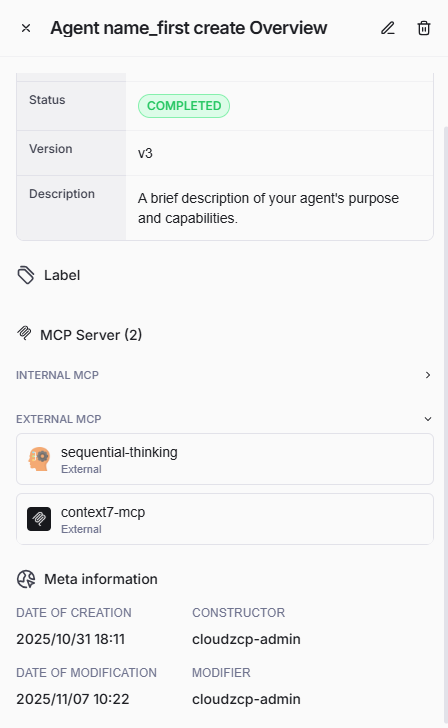
This screen is located at the right side of the Agent Profile listing page.
Basic Information
The first section of this screen displays the core details of the agent including:
- Name: The agent's unique identifier or name (e.g.,Â
kks-sa-001). - Status: Current status of the agent (e.g.,Â
DRAFT,ÂCOMPLETED). - Version: Version number of the profile (e.g.,Â
v7,Âv3). - Description: A brief summary of the agent’s purpose, features, or other notes.
Label
The labels appear as small, rounded tags under the “Label†section. They are the tags associated with the agent, used for categorization (e.g., env: uat).
MCP Server
This section reveals how many and list all the MCP servers connected to the agent, divided into two types of MCP server:
- Internal MCP
- External MCP
Here you can verify MCP server connections to ensure proper integration.
Meta Information
This section provides audit and history details about the agent profile, including:
- Date of Creation: When the agent profile was created.
- Constructor: User who created the agent profile.
- Date of Modification: Most recent modification date/time.
- Modifier: User who last modified the agent profile.
You can check this meta information for audit trails and accountability.