Playground KDB
Use Playground KDB to test how well your Knowledge DB retrieves relevant content before connecting it to an agent.
Open Playground
- Go to Knowledge DB.
- Select a KDB from the list.
- Click the vertical ellipsis at KDB card and select Playground action to open the test screen.
Playground Layout
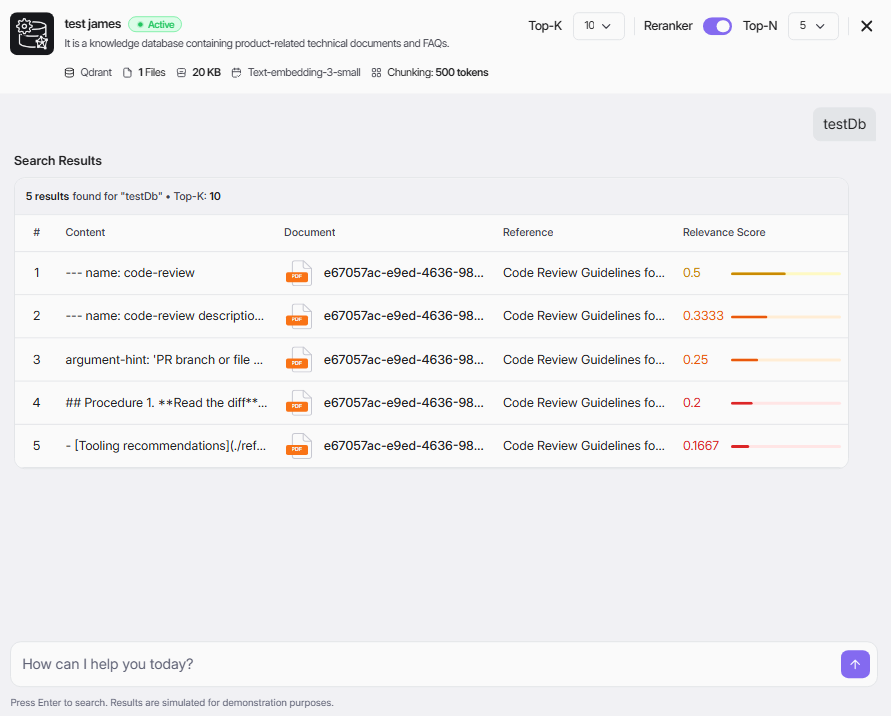
At the top, you can review KDB metadata such as:
- KDB name and status
- Vector DB
- Number of files
- Total size
- Embedding model
- Chunking size
Main areas:
- Search input at the bottom
- Search Results table in the center
- Retrieval controls at the top-right
Retrieval Controls
Configure retrieval quality before searching:
- Top-K: Number of initial chunks to retrieve.
- Reranker: Enable to re-rank retrieved chunks for better relevance.
- Top-N: Number of final chunks shown after reranking.
Recommended start:
- Top-K:Â 10
- Reranker:Â On
- Top-N:Â 5
Run a Search Test
- Enter a test question in the input box (for example:Â testDb).
- Press Enter.
- Review returned rows in Search Results.
Understand Search Results
Each row shows:
- #: Rank position
- Content: Retrieved text chunk
- Document: Source file identifier
- Reference: Source title/section
- Relevance Score: Similarity score and visual bar
Higher relevance score means better match to your query.
Tuning Tips
- If results are too broad: lower Top-K or Top-N.
- If important text is missing: increase Top-K.
- If ranking quality is weak: keep Reranker enabled.
- If chunks look fragmented: adjust chunking settings in KDB configuration and re-test.
Exit Playground
Click the close icon (X) at the top-right to leave Playground and return to KDB list.