Delete Agent Profile
The NPO Studio allows administrators to efficiently manage and delete agent profiles. Follow these steps to safely delete an agent profile from the AI Agent management module:
-
On the AI Agent > Agent Profiles page, you will see a list or grid of all agent profiles.
-
Use the search bar at the top to quickly find the agent profile you want to delete by typing the agent's name or relevant keywords. Alternatively, scroll through the list or grid to browse and find the desired profile.
In Grid View mode, click on the three-dot menu on the profile card to find the delete button (trash icon):
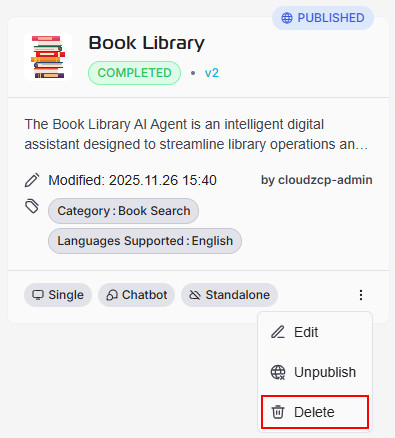
In List View mode, click on the delete button (trash icon) in the Action column for the selected AI Agent profile:

- After clicking Delete, a confirmation dialog will appear:
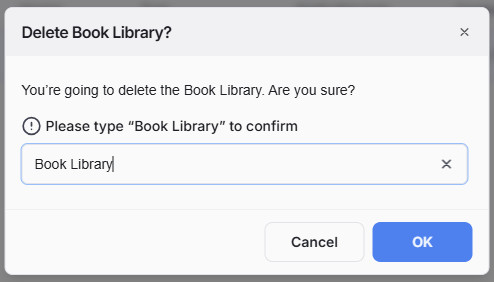
This is designed to prevent accidental deletions. The dialog will show the name of the agent profile you are about to delete and prompt you to type the profile name in the provided text box to confirm your intent. Carefully review then enter the exact profile name in the confirmation box.
- Click OK to confirm and proceed with deletion. If you are unsure or want to cancel, click Cancel to abort the deletion process.
- Deletion is permanent: Once an agent profile is deleted, it cannot be restored. Make sure you have backed up or exported any necessary data before proceeding.
- Permissions required: Only users with administrative privileges can delete agent profiles.
- Safety reminder: Double-check the profile name before finalizing deletion to avoid removing the wrong agent profile.