Create Gateway Config
Access Create Gateway Config Screen
From the Gateway Config List page, click Create Config button at the top-right corner of the screen.

Step 1: Fill in the Create Gateway Config form
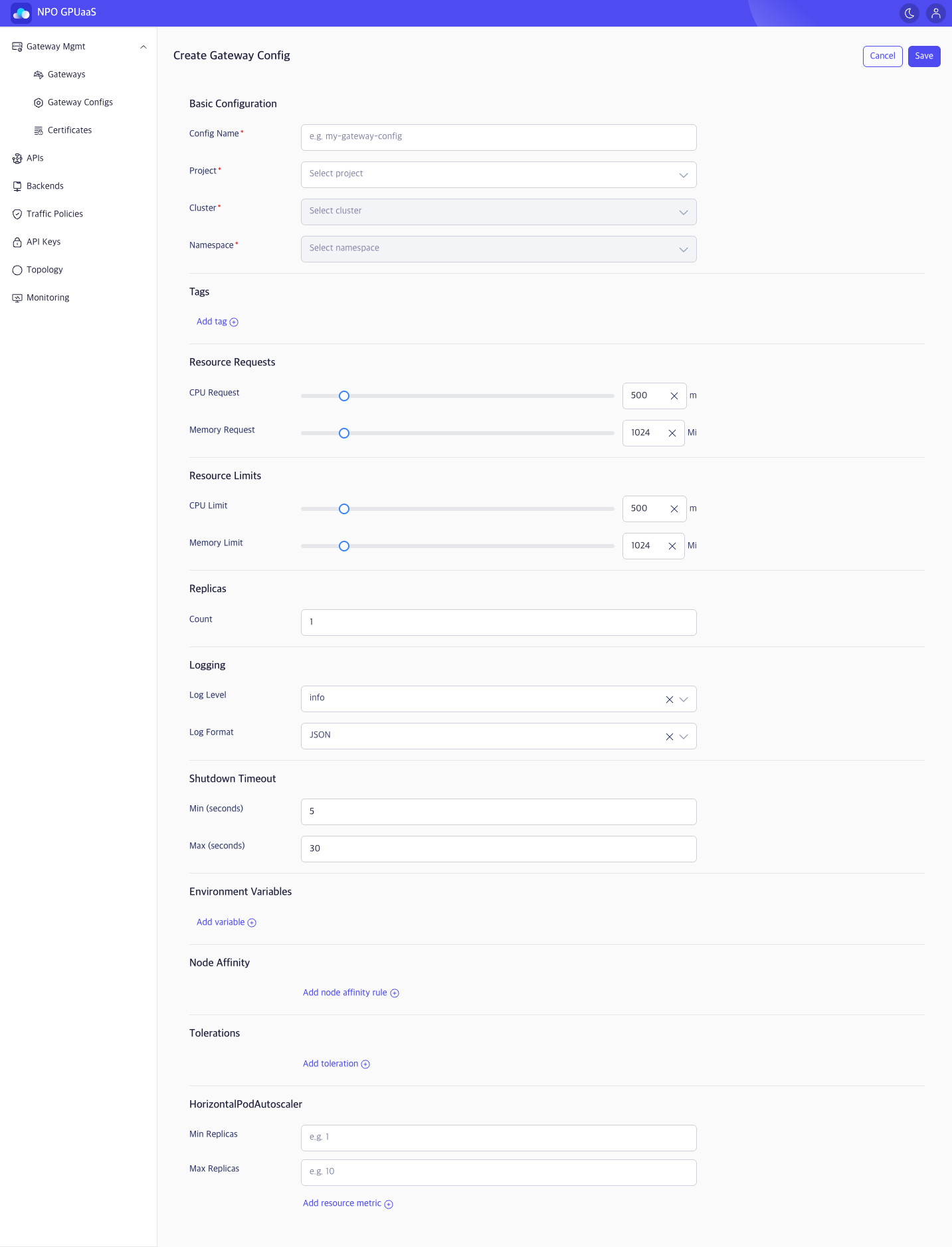
Basic Configuration
- Config Name (Required): Gateway Config identifier (e.g., my-gateway-config). Must follow Kubernetes naming rules.
- Project (Required): Select a project (depend on workspace context).
- Cluster (Required): Select a cluster under the chosen Project.
- Namespace (Required): Select a namespace under the chosen Cluster.
Tags
User can add multiple tags for filtering on the Gateway list.
-
Click Add tag and enter Key and Value:

-
Multiple tags are supported.
Resource Requests
- CPU Request:
- Use the slider for quick adjustment or type an exact value in the input field.
- Unit: millicore (m).
- Memory Request:
- Use the slider for quick adjustment or type an exact value in the input field.
- Unit: mebibyte (Mi).
Notes:
- Default values: 500m/ 1024Mi
Resource Limit
- CPU Limit:
- Use the slider for quick adjustment or type an exact value in the input field.
- Unit: millicore (m).
- Memory Limit:
- Use the slider for quick adjustment or type an exact value in the input field.
- Unit: mebibyte (Mi).
Notes:
- Default values: 500m/ 1024Mi
Replicas
- Value must be an integer.
Logging
- Log Level: Select the logging verbosity (e.g., info).
- Log Format: Select the output format (e.g., JSON).
Shutdown Timeout
- Min (seconds): Minimum shutdown timeout (e.g., 5)
- Max (seconds): Maximum shutdown timeout (e.g., 30)
Environment Variables
-
Click Add variable and enter Variable name and Value to add a new variable:

-
Multiple variables are supported
Node Affinity
- Enter a Key, Value and select an operator to add node affinity.
- Multiple node affinity rules are supported.
Tolerations
- Enter a Key, Value and select an operator to add node affinity.
- Multiple tolerations are supported.
HorizontalPodAutoscaler
- Min Replicas: Minimum number of replicas (integer, e.g., 1)
- Max Replicas: Maximum number of replicas (integer, e.g., 10)
-
Resource metrics:
- User can click Add resource metric to add multiple scaling metrics, enabling replicas to scale automatically based on resource usage:

- User can click Add resource metric to add multiple scaling metrics, enabling replicas to scale automatically based on resource usage:
Step 2: Save or Cancel
- After completing the form, click Save to create Gateway Config.
- In case you want to discard the changes, click Cancel and navigates back to the Gateway Config List page.