Create API Key
Access Create Key Screen
From the API Key List page, click Create Key button at the top-right corner of the screen.

Step 1: Fill in the Create API Key form
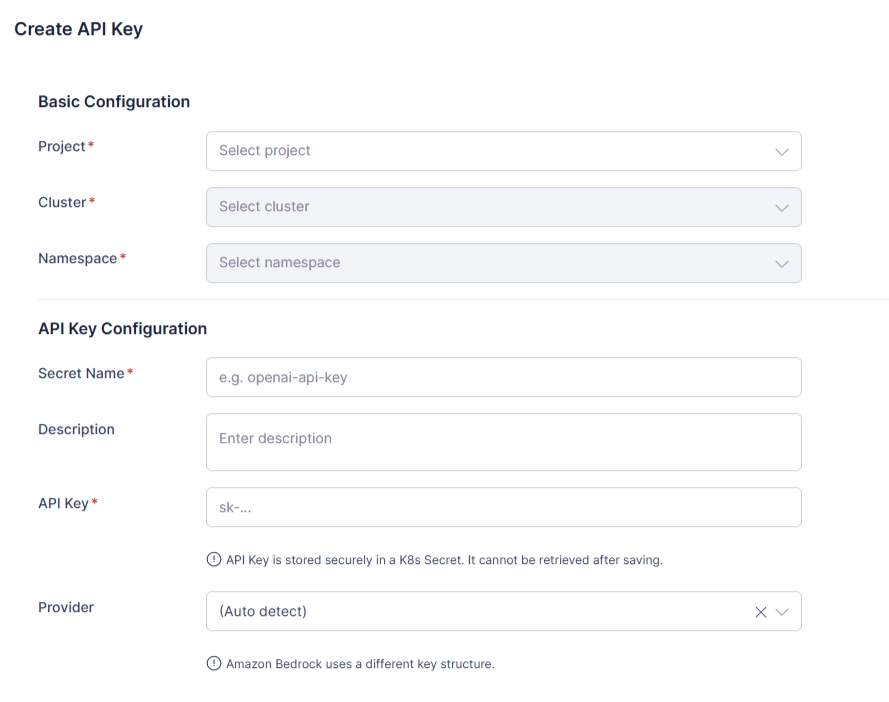
Basic Configuration
- Project (Required): Select a project.
- Cluster (Required): Select a cluster under the chosen Project.
- Namespace (Required): Select a namespace under the chosen Cluster.
API Key Configuration
- Secret Name (Required): Enter the Secret name (e.g., openai-api-key). Must follow Kubernetes naming rules.
- Description: Enter short description about key.
- API Key (Required): Enter the provider API key.
- Provider (Optional): Defaults to (Auto detect).
- The system attempts to detect the provider based on the key prefix.
- If auto-detection fails, select the provider manually.
Step 2: Save or Cancel
- After completing the form, click Save to create API Key.
- In case you want to discard the changes, click Cancel and navigates back to the API Key List page.